Migrating from 1.0.0 to 1.1.0
For feature and product changes in the target release, see OLIVE Version 1.1.0.
Adapt Keycloak Realm for Editor Role
We introduced a new role to differentiate connectivity consumers from connectivity editors. You can find more details about the purpose of this role in OLIVE 1.1.0 — Documentation (Roles and Permissions).
This section outlines the required steps to update an existing Keycloak realm—originally created with OLIVE Platform version 1.0.0—so that it is fully compatible with version 1.1.0 and can take advantage of the new role.
When creating a new deployment with a new tenant, the Keycloak onboarding jobs automatically create the required roles and configure the corresponding clients. In this case, no migration effort is required.
Please note that this adaptation is only necessary for production deployments that use authentication and role-based authorization.
Create Editor Realm Role
We first create a new realm role Editor.
The official Keycloak documentation for creating realm roles is here: Creating realm roles.
The steps are:
- Navigate to Realm roles.
- Create a new entry with the role name
editorand provide a description.
Adapt Existing OIDC Clients
During automated realm onboarding in OLIVE Platform version 1.0.0, two clients are created by default:
olive-gatewayolive-gateway-admin
The olive-gateway client is created without any roles assigned. The olive-gateway-admin client is created with the admin realm role.
We recommend assigning the editor realm role to the olive-gateway client. Depending on operational requirements, operators may optionally introduce an additional client (for example, olive-gateway-user) that carries neither the admin nor the editor role. Such a client can be useful when its sole purpose is to invoke existing connectivity without creating or managing it.
To grant the olive-gateway client the editor realm role, complete the following steps:
- Navigate to the Clients list of the relevant realm.
- Select the
olive-gatewayclient. - Open the Roles tab.
- Create a new role named
editor. - Open the Associate roles tab and assign the editor realm role to the new client role.
Hint: You can filter by clients or realm roles; use the realm role filter to locate the editor role. - Open the Service account roles tab of the client.
- Assign the
olive-gatewayeditor client role.
Once these steps are complete, the olive-gateway client is authorized to execute all APIs designated for the editor role.
Updating User Permissions After Migration from OLIVE Platform 1.0.0
If you created non-admin users in Keycloak under OLIVE Platform version 1.0.0 who should continue to have permissions to create, delete, and modify connectivity, you must assign the editor realm role to those users.
To grant a user the editor realm role, perform the following steps:
- In the target realm, navigate to Users.
- Select the user who should receive the editor role.
- Ensure that the editor realm role has already been created.
- Open the Role Mapping tab and select Assign Role.
- Filter by Realm Roles.
- Select the editor realm role and confirm the assignment.
Once assigned, the user retains all permissions required to manage connectivity resources.
Prepare for the Workflow Engine
OLIVE 1.1.0 introduces a workflow engine that requires a PostgreSQL backend. Before deploying OLIVE, the CloudNativePG (CNPG) operator must be installed once per Kubernetes cluster.
The CNPG operator is a Kubernetes controller responsible for the lifecycle management of PostgreSQL clusters. It automates operational tasks such as:
- provisioning and configuring PostgreSQL instances,
- managing high availability and failover,
- handling backups, restores, and upgrades,
- ensuring consistency and health of PostgreSQL resources through Kubernetes-native reconciliation.
OLIVE uses this operator to provision and manage the PostgreSQL database required by Temporal, which the workflow engine relies on to persist workflow state, execution progress, and metadata. By delegating database operations to CNPG, OLIVE avoids embedding database lifecycle logic and ensures a production-grade, highly available PostgreSQL setup.
The CNPG operator is cluster-scoped and shared across workloads; it only needs to be installed once.
To install the CloudNativePG operator, execute the following command:
# installs the operator into cnpg-system
kubectl apply --server-side -f \
  https://raw.githubusercontent.com/cloudnative-pg/cloudnative-pg/release-1.27/releases/cnpg-1.27.1.yaml

# verify it's up
kubectl -n cnpg-system get deploy,po
kubectl get crd | grep postgresql.cnpg.io
Replacing MinIO with Seaweed FS
In OLIVE version 1.1.0 we switched from MinIO to Seaweed FS.
Stateful resources keep permanent data and are therefore handled more strictly during the upgrade process.
We cover all steps that are necessary to provide a flawless migration from MinIO to Seaweed FS during the OLIVE release strategy.
Before starting the upgrade process, export the repository.
As the stateful resources will be recreated during the migration step, we will manually delete all existing HashiCorp secrets from the vault.
Replace all placeholders in the following command and execute it on your master node:
# Replace <tenant_name> in each path and set VAULT_TOKEN before executing.
kubectl exec -n hashicorp-vault vault-0 -- sh -lc "
  export VAULT_TOKEN='<Initial HashiCorp Root Token>';
  vault kv metadata delete secret/shared-secrets-<tenant_name>/minio-credentials &&
  vault kv metadata delete secret/shared-secrets-<tenant_name>/couchdb-credentials &&
  vault kv metadata delete secret/shared-secrets-<tenant_name>/opensearch-credentials
"
Due to the introduction of new services and the renaming of existing services, we need to change the values file accordingly.
Disable auto-sync (Argo CD)
Before adapting and pushing the changes of the configuration files (values.yaml and app.yaml), deactivate auto-sync for your dedicated Argo CD applications.
Per application (that will be migrated) click on Details → Edit and in the sync policy section, disable auto-sync.
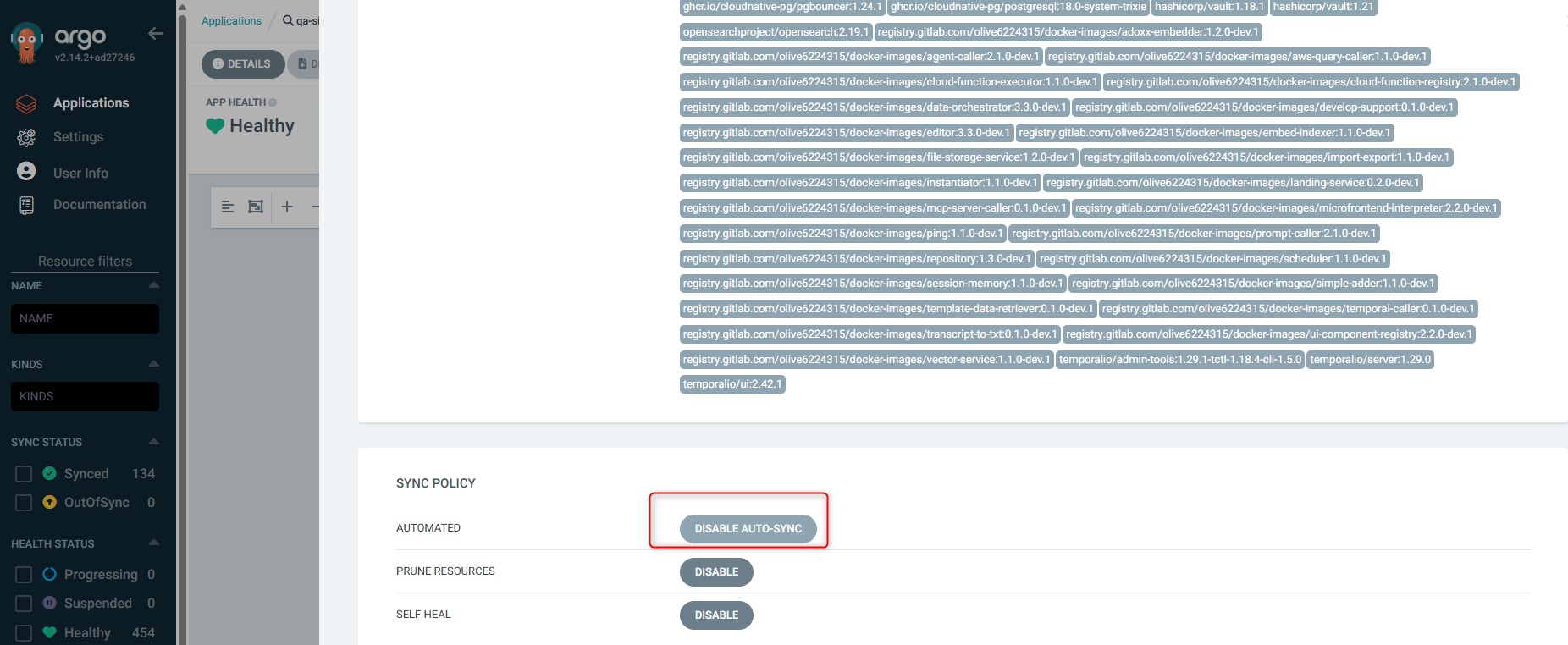
Adapt values.yaml file
OLIVE Version 1.0.0
global:
  tenant: "tenant-name"
  namespace: "tenant-name"
  clusterName: "develop"
  infraName: "dev"
  domain: "olive"
  resolveTLS: true
  deploymentMode: "single-no-auth"
  commonLibraryName: "tenant-name"
  oliveCore: false
  controlPlane: false
  express:
    sharedNamespace: "tenant-name"
  jwtIssuer:
    rootPath: "https://authenticate.develop.olive/realms/"

  clusterIssuer: step-acme


rbac:
  adminUser: tenant-name@admin.com

services:
  infra:
    certificate: true
    auth-proxy: false
    keycloak-setup: false
    tenant-setup: true
    vault-secrets-setup: true
  stateful:
    couchdb: true
    minio: true
    opensearch: true
  core:
    cloud-function-registry: true
    instantiator: true
    data-orchestrator: true
    file-storage-service: true
    import-export: true
    ui-component-registry: true
    microfrontend-interpreter: true
    editor: true
    repository: true
    session-memory: true
    template-data-retriever: true
    tenant-lifecycle-manager: false
  extensions:
    adoxx-content-to-embedable-content: true
    agent-caller: true
    aws-query-caller: true
    cloud-function-executor: false
    embed-indexer: true
    mcp-server-caller: true
    prompt-caller: true
    transcript-to-txt: true
    vector-service: true
  qa:
    ping: true
    simple-adder: true
OLIVE Version 1.1.0
global:
  tenant: "tenant-name"
  namespace: "tenant-name"
  clusterName: "develop"
  infraName: "dev"
  domain: "olive"
  resolveTLS: true
  deploymentMode: "single-no-auth"
  commonLibraryName: "tenant-name"
  controlPlane: false
  oliveCore: false
  createNamespace: false
  temporal:
    enabled: true
  express:
    sharedNamespace: "tenant-name"
  jwtIssuer:
    rootPath: https://authenticate.develop.olive/realms/
  clusterIssuer: step-acme

scheduler:
  schedule-trigger-cron-job:
    schedule:
      cronSchedule: "*/1 * * * *"

rbac:
  adminUser: "tenant-name@admin.com"

services:
  infra:
    certificate: true
    auth-proxy: false
    keycloak-setup: false
    tenant-setup: true
    vault-secrets-setup: true
    workflow-engine-postgres: true
  stateful:
    couchdb: true
    seaweedfs: true
    opensearch: true
  core:
    landing-service: true
    cloud-function-registry: true
    instantiator: true
    data-orchestrator: true
    file-storage-service: true
    import-export: true
    ui-component-registry: true
    microfrontend-interpreter: true
    editor: true
    repository: true
    scheduler: true
    session-memory: true
    template-data-retriever: true
  extensions:
    adoxx-embedder: true
    agent-caller: true
    aws-query-caller: true
    cloud-function-executor: false
    embed-indexer: true
    mcp-server-caller: true
    prompt-caller: true
    temporal-caller: true
    transcript-to-txt: true
    vector-service: true
    develop-support: true
  qa:
    ping: true
The scheduler configuration is configured in this values.yaml file to check every minute if a connectivity should be triggered.
If you want to change the schedule, refer to the Kubernetes documentation: CronJob.
After adapting the values.yaml and the app.yaml (new version), we also need to apply specific settings to sync via Argo CD successfully.
To be able to update or delete StatefulSet resources (for example, MinIO → Seaweed FS), we need to enable the following settings for the sync process:
- Prune
- Force
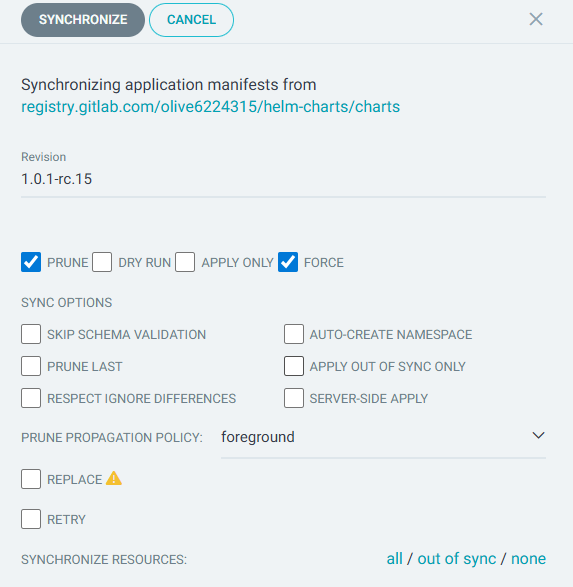
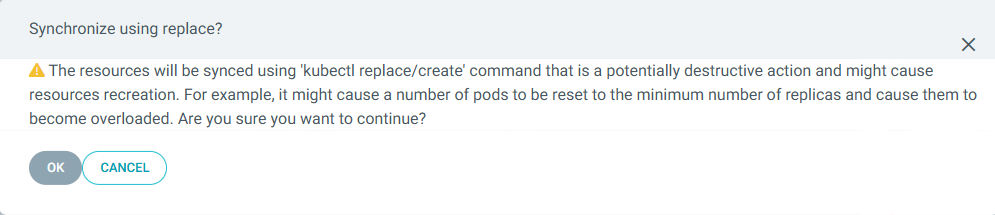
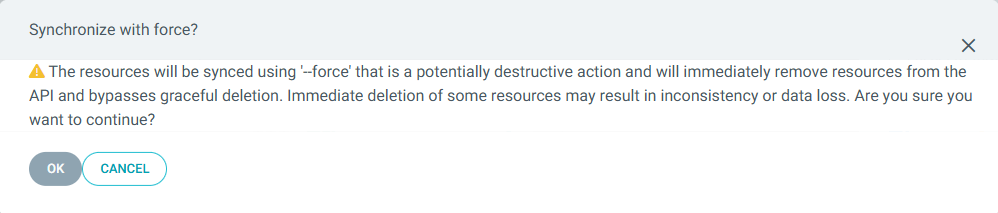
After the successful sync (upgrade to the latest released OLIVE version), you can enable auto-sync again for the updated applications.
Further, you need to initialize the cloud-function-registry again to adapt to the changed service names:
curl -X POST "https://api.<tenant_name>.<cluster>.<domain>/cloud-function-registry/init"
You should receive a similar service list as response:
{
  "functions": [
    "repository-get",
    "repository-delete",
    "repository-add",
    "repository-addMultiple",
    "repository-clear",
    "repository-import",
    "repository-export",
    "oli-service-lookup-get",
    "oli-service-lookup-delete",
    "oli-service-lookup-add",
    "oli-service-lookup-addMultiple",
    "oli-service-lookup-clear",
    "oli-service-lookup-import",
    "oli-service-lookup-export",
    "oli-schema-registry-dev-get",
    "oli-schema-registry-dev-storeSchemas",
    "service-lookup-get",
    "service-lookup-delete",
    "service-lookup-add",
    "service-lookup-addMultiple",
    "service-lookup-clear",
    "service-lookup-import",
    "service-lookup-export",
    "schema-registry-dev-get",
    "schema-registry-dev-storeSchemas",
    "data-orchestrator-execute",
    "data-orchestrator-invoke",
    "data-orchestrator-poll",
    "data-orchestrator-invokeSync",
    "data-orchestrator-setResponse",
    "data-layer-execute",
    "data-layer-invoke",
    "data-layer-poll",
    "data-layer-invokeSync",
    "data-layer-setResponse",
    "ui-component-registry-getLatest",
    "ui-component-registry-get",
    "ui-component-registry-add",
    "pilet-registry-getLatest",
    "pilet-registry-get",
    "pilet-registry-add",
    "import-export-import",
    "import-export-export",
    "import-export-check-conflicts",
    "simpleAdder-dev-add",
    "prompt-caller-call",
    "agent-caller-call",
    "ping-ping",
    "ping-echo",
    "ping-file",
    "vault-secret",
    "vector-service-clearIndex",
    "vector-service-store",
    "vector-service-search",
    "vector-service-delete",
    "embed-indexer-bulk",
    "embed-indexer-state",
    "embed-indexer-start",
    "adoxx-content-to-embedable-content-transformModel",
    "adoxx-content-to-embedable-content-transformModelInstance",
    "adoxx-content-to-embedable-content-transformRepoObject",
    "file-storage-service-get",
    "file-storage-service-listFiles",
    "file-storage-service-listNamesOfFiles",
    "file-storage-service-upload",
    "aws-query-caller-aws-query-caller-call",
    "session-memory-setService",
    "session-memory-getService",
    "session-memory-getAllService",
    "session-memory-deleteService",
    "session-memory-clearService",
    "instantiator-instantiate",
    "connectivity-instantiator-instantiate",
    "template-data-retriever-getData",
    "temporal-caller-call",
    "transcript-to-txt-getText",
    "lib-file-storage-service-get",
    "lib-file-storage-service-listFiles",
    "lib-file-storage-service-listNamesOfFiles",
    "lib-service-lookup-get",
    "lib-pilet-registry-getLatest",
    "lib-file-storage-service-upload",
    "lib-pilet-registry-add",
    "lib-service-lookup-import",
    "lib-service-lookup-export",
    "scheduler-add-task",
    "scheduler-delete-task",
    "scheduler-reschedule-all",
    "mcp-server-caller",
    "mcp-server-tool-echo",
    "mcp-server-tool-add",
    "mcp-server-tool-reverse",
    "mcp-server-tool-time",
    "tenant-lifecycle-manager-onboard-add-tenant",
    "tenant-lifecycle-manager-onboard-upgrade-tenant",
    "tenant-lifecycle-manager-onboard-argocd-poll",
    "tenant-lifecycle-manager-onboard-get-keycloak-secret",
    "tenant-lifecycle-manager-offboard-remove-tenant",
    "tenant-lifecycle-manager-offboard-remove-secrets",
    "tenant-lifecycle-manager-offboard-remove-auth",
    "tenant-lifecycle-manager-get-namespaces",
    "tenant-lifecycle-manager-get-services",
    "tenant-lifecycle-manager-get-values",
    "tenant-lifecycle-manager-refresh-cache"
  ],
  "created": [
    "repository-get",
    "repository-delete",
    "repository-add",
    "repository-addMultiple",
    "repository-clear",
    "repository-import",
    "repository-export",
    "oli-service-lookup-get",
    "oli-service-lookup-delete",
    "oli-service-lookup-add",
    "oli-service-lookup-addMultiple",
    "oli-service-lookup-clear",
    "oli-service-lookup-import",
    "oli-service-lookup-export",
    "oli-schema-registry-dev-get",
    "oli-schema-registry-dev-storeSchemas",
    "service-lookup-get",
    "service-lookup-delete",
    "service-lookup-add",
    "service-lookup-addMultiple",
    "service-lookup-clear",
    "service-lookup-import",
    "service-lookup-export",
    "schema-registry-dev-get",
    "schema-registry-dev-storeSchemas",
    "data-orchestrator-execute",
    "data-orchestrator-invoke",
    "data-orchestrator-poll",
    "data-orchestrator-invokeSync",
    "data-orchestrator-setResponse",
    "data-layer-execute",
    "data-layer-invoke",
    "data-layer-poll",
    "data-layer-invokeSync",
    "data-layer-setResponse",
    "ui-component-registry-getLatest",
    "ui-component-registry-get",
    "ui-component-registry-add",
    "pilet-registry-getLatest",
    "pilet-registry-get",
    "pilet-registry-add",
    "import-export-import",
    "import-export-export",
    "import-export-check-conflicts",
    "simpleAdder-dev-add",
    "prompt-caller-call",
    "agent-caller-call",
    "ping-ping",
    "ping-echo",
    "ping-file",
    "vault-secret",
    "vector-service-clearIndex",
    "vector-service-store",
    "vector-service-search",
    "vector-service-delete",
    "embed-indexer-bulk",
    "embed-indexer-state",
    "embed-indexer-start",
    "adoxx-content-to-embedable-content-transformModel",
    "adoxx-content-to-embedable-content-transformModelInstance",
    "adoxx-content-to-embedable-content-transformRepoObject",
    "file-storage-service-get",
    "file-storage-service-listFiles",
    "file-storage-service-listNamesOfFiles",
    "file-storage-service-upload",
    "aws-query-caller-aws-query-caller-call",
    "session-memory-setService",
    "session-memory-getService",
    "session-memory-getAllService",
    "session-memory-deleteService",
    "session-memory-clearService",
    "instantiator-instantiate",
    "connectivity-instantiator-instantiate",
    "template-data-retriever-getData",
    "temporal-caller-call",
    "transcript-to-txt-getText",
    "lib-file-storage-service-get",
    "lib-file-storage-service-listFiles",
    "lib-file-storage-service-listNamesOfFiles",
    "lib-service-lookup-get",
    "lib-pilet-registry-getLatest",
    "lib-file-storage-service-upload",
    "lib-pilet-registry-add",
    "lib-service-lookup-import",
    "lib-service-lookup-export",
    "scheduler-add-task",
    "scheduler-delete-task",
    "scheduler-reschedule-all",
    "mcp-server-caller",
    "mcp-server-tool-echo",
    "mcp-server-tool-add",
    "mcp-server-tool-reverse",
    "mcp-server-tool-time",
    "tenant-lifecycle-manager-onboard-add-tenant",
    "tenant-lifecycle-manager-onboard-upgrade-tenant",
    "tenant-lifecycle-manager-onboard-argocd-poll",
    "tenant-lifecycle-manager-onboard-get-keycloak-secret",
    "tenant-lifecycle-manager-offboard-remove-tenant",
    "tenant-lifecycle-manager-offboard-remove-secrets",
    "tenant-lifecycle-manager-offboard-remove-auth",
    "tenant-lifecycle-manager-get-namespaces",
    "tenant-lifecycle-manager-get-services",
    "tenant-lifecycle-manager-get-values",
    "tenant-lifecycle-manager-refresh-cache"
  ]
}
Now, you have to re-import the repository via the Editor.
Changes to repository content format
The following changes were made in the data structure of OLIVE element data structures and might need to be changed manually:
DataPort
- Renamed to DataHandler.
- Moved and renamed the
inandoutproperties from DataHandler toinputandoutputin ConnectableElement.
Example old:
{
  "id": "example-datapoint",
  "type": "datapoint",
  "version": "0.0.1",
  "name": "example-datapoint",
  "datapoint": {
    "...": "..."
  },
  "dataPort": {
    "in": {
      "schema": {
        "type": "json",
        "json": {
          "...": "..."
        }
      }
    },
    "out": {
      "schema": {
        "type": "json",
        "json": {
          "...": "..."
        }
      }
    }
  }
}
Example new:
{
  "id": "example-datapoint",
  "type": "datapoint",
  "version": "0.0.1",
  "name": "example-datapoint",
  "datapoint": {
    "...": "..."
  },
  "input": {
    "schema": {
      "type": "json",
      "schema": {
        "...": "..."
      }
    }
  },
  "output": {
    "schema": {
      "type": "json",
      "schema": {
        "...": "..."
      }
    }
  }
}
Schema
- Renamed
jsonproperty toschema. - Removed
xmlproperty.
TransformerDatapoint
- Renamed
adaptproperty totransform. - Format of transformations has changed; it now requires wrapping in
${ }.
Old:
{
  "id": "example-datapoint",
  "type": "datapoint",
  "version": "0.0.1",
  "name": "example-datapoint",
  "datapoint": {
    "type": "transform",
    "transform": {
      "adapt": "{ \"title\": input.name, \"icon\": input.iconUrl }"
    }
  }
}
New:
{
  "id": "example-datapoint",
  "type": "datapoint",
  "version": "0.0.1",
  "name": "example-datapoint",
  "datapoint": {
    "type": "transform",
    "transform": {
      "transform": "${ { \"title\": input.name, \"icon\": input.iconUrl } }"
    }
  }
}
- Removed
asObjectproperty.
HttpDatapoint
- The behavior of the previous
strictparameter is now default. - Input for HTTP datapoints are no longer automatically forwarded to the HTTP request.
- Removed
strictparameter.
Renamed services
| Service name 1.0.0 | URL 1.0.0 | Service name 1.1.0 | URL 1.1.0 |
|---|---|---|---|
data-layer | https://api.<your-tenant-domain>/data-layer | data-orchestrator | https://api.<your-tenant-domain>/data-orchestrator |
service-lookup | https://api.<your-tenant-domain>/service-lookup | repository | https://api.<your-tenant-domain>/repository |
The old URLs are still valid in OLIVE version 1.1.0 but are deprecated and will be removed in the future.
For more information see OLIVE 1.1.0 — Documentation (Naming improvements in OLIVE Platform version 1.1.0).