Migration 1.1.x to 1.2.0
For feature and product changes in the target release, see OLIVE Version 1.2.0.
Changes to repository content format
Changes to files as input of datapoints and connectors
In the past files were only supported as input for datapoints and connectors in a few limited scenarios. To support more use cases OLIVE file input & output handling was reworked entirely. If any datapoint or connector expects a file as input, most likely changes will need to be done to how the file is handled and processed.
For details on how files are now supported and how to access them in Datapoints and Connectors see chapter "File handling in Connectivity" in the OLIVE connectivity developer handbook.
OAuth default behavior changed
In the past, OAuth credentials were always sent as part of the http body of the token fetch request. This is however not the recommended behavior when implementing OAuth authentication. Therefore, the default behavior was changed to send credentials as part of an Authorization header in the token fetch http request. If the previous functionality - sending the credentials as body - is needed it can be enabled with the flag "credentialsInBody" of OAuth Auth elements.
Manual Datapoints are now asynchronous
Manual Datapoints are now asynchronous and are now waiting for a response by default. This means that when using a manual task as part of a Connector, the Connector will wait until it receives an asynchronous result from the manual datapoint. If it does not receive such a result it will never finish.
For details on how to use asynchronous Datapoint in general and how to inform the data orchestrator about their results see chapter "Long Running & Asynchronous Datapoints" in the OLIVE connectivity developer handbook.
Change Ingress from NGINX to Traefik
Ingress Controller Support
Starting with OLIVE Platform version 1.2.0, the officially supported ingress controller is Traefik. All validation and testing for this release have been performed using Traefik.
While NGINX Ingress Controller may still function in existing environments, it is no longer part of our tested and supported configuration baseline.
This change aligns with upstream developments in RKE2. The RKE2 project has deprecated support for NGINX as a bundled or maintained ingress option. As a result, NGINX may continue to operate, but it no longer receives security updates, which introduces potential risks for production deployments.
For further details, refer to the official RKE2 documentation: RKE2 documentation
Recommendation
Due to the lack of ongoing security maintenance for NGINX, we strongly recommend migrating to Traefik as the ingress controller for OLIVE Platform deployments.
Please coordinate this transition with your cluster operator to ensure compatibility with your cluster configuration and operational requirements.
If you are using the laboratory setting documented by the OLIVE team, please do this migration as well. Please note that earlier versions of the OLIVE platform won't work with Traefik.
Switch to Traefik as Ingress Controller
Enable Traefik as Ingress Controller in RKE2
Edit the RKE2 distribution configuration:
sudo vi /etc/rancher/rke2/config.yaml
Then add Traefik as the ingress controller:
ingress-controller: traefik
It will then look like this:

Next, restart the cluster:
sudo systemctl restart rke2-server
Configure Traefik
Create a new HelmChartConfig that extends the RKE2-managed Traefik installation with three capabilities:
- Allow routing to ExternalName Services.
- Correctly advertise the external entrypoint IP/hostname (published service).
- Enable the RedirectErrors Traefik plugin and give it writable plugin storage.
Create or edit the Traefik config:
sudo vi rke2-traefik-config.yaml
Add this content to it:
apiVersion: helm.cattle.io/v1
kind: HelmChartConfig
metadata:
  name: rke2-traefik
  namespace: kube-system
spec:
  valuesContent: |-
    providers:
      kubernetesIngress:
        allowExternalNameServices: true
        publishedService:
          enabled: true
    experimental:
      abortOnPluginFailure: true
      plugins:
        redirectErrors:
          moduleName: github.com/indivisible/redirecterrors
          version: v0.1.0

    deployment:
      additionalVolumes:
        - name: plugins-storage
          emptyDir: {}
providers.kubernetesIngress.allowExternalNameServices: true
Allows Traefik’s Kubernetes Ingress provider to forward traffic to Services of type ExternalName.
ExternalName Services are DNS aliases inside the cluster that point to an external DNS name (for example, a managed service, a legacy endpoint, or a service in another cluster or network). By default, many ingress controllers restrict this because it can be used to route traffic outside the cluster unexpectedly. Enabling it explicitly tells Traefik that using ExternalName backends is allowed.
providers.kubernetesIngress.publishedService.enabled: true
Instructs Traefik to treat its own Service (the LoadBalancer or NodePort service that exposes Traefik) as the published entrypoint.
Traefik uses the published service information to determine the public IP or hostname of the ingress entrypoint. This affects how Traefik reports addresses and can be important for:
- correct external address association in
Ingress.status.loadBalancer - generating absolute redirects when Traefik must infer the public-facing endpoint
- setups where Traefik runs behind a LoadBalancer and needs to know the external address rather than a Pod IP
In short: it helps Traefik understand what clients actually connect to, not only what Traefik runs on internally.
experimental.plugins.redirectErrors (moduleName + version)
Enables the RedirectErrors plugin in Traefik’s static configuration so it can be referenced by Middleware CRDs.
When using forwardAuth, unauthenticated requests commonly result in 401/403 responses from the auth endpoint. Browsers do not automatically turn those into a login redirect. This plugin lets you define middleware that says: if the response status is 401–403, return a 302 redirect to the login or start URL instead of the error.
That matches what you may have achieved with NGINX’s auth-signin (redirect) and auth-url (auth check), expressed in Traefik terms.
deployment.additionalVolumes.plugins-storage: emptyDir
Provides a writable filesystem at the location Traefik uses to download and cache plugin code (/plugins-storage).
In hardened Kubernetes environments (and in some RKE2 defaults), the container filesystem can be read-only. Traefik plugins must be downloaded at startup and stored on disk. Without a writable /plugins-storage, Traefik logs errors such as:
unable to create directory /plugins-storage/sources ... read-only file system
and disables all plugins.
Mounting an emptyDir gives Traefik ephemeral writable storage (lifetime = Pod lifetime). That is enough for plugins, because Traefik can re-download them on restart.
Apply the Traefik configuration:
kubectl apply -f rke2-traefik-config.yaml

Restart Traefik:
kubectl -n kube-system rollout restart ds/rke2-traefik
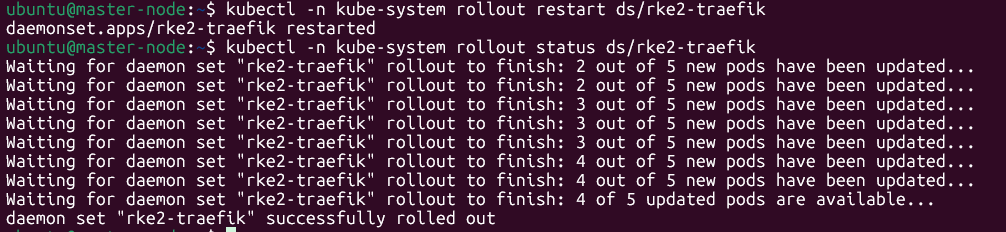
Check the status:
kubectl -n kube-system rollout status ds/rke2-traefik
Validate that external names are working:
kubectl -n kube-system logs ds/rke2-traefik --tail=200 | grep -i externalname || true

Validate that the plugin redirecterrors is loaded:
kubectl -n kube-system logs ds/rke2-traefik --tail=200 | grep -i -E "Loading plugins|Plugins are disabled|plugins-storage"

Ensure CoreDNS works
Ensure that you can still resolve DNS after the cluster restart. See your lab setup documentation (for example Setup Internal DNS Server — use DNS server in the Kubernetes cluster).
Adapt Step ACME ClusterIssuer
Edit the cluster issuer you created during lab setup (see Install Certificate Manager and use Ingress Controller — Create ClusterIssuer in that guide):
vi step-acme-clusterissuer.yaml
Set the ingress class to traefik everywhere your issuer references an ingress class (for example HTTP-01 solver ingress class names that previously pointed at NGINX).
Then apply it:
kubectl apply -f step-acme-clusterissuer.yaml
Observe that the change was applied and that it is ready:
kubectl describe clusterissuer step-acme
If issues persist (for example, middleware stuck), roll out Traefik again:
kubectl -n kube-system rollout restart ds/rke2-traefik
Upgrade Argo CD and Keycloak charts
Argo CD and Keycloak have been adapted for Traefik integration. Upgrade both Helm installations to the latest supported chart versions.
Verify and reuse existing Helm chart values for each installation:
helm get values argocd -n argocd -a -o yaml > argocd-values.yaml
helm get values keycloak -n keycloak -a -o yaml > keycloak-values.yaml
Make sure that TLS for your custom DNS still resolves correctly—for example, that opening your Keycloak URL (for example https://authenticate.develop.olive/) in a browser that trusts your custom root CA shows a valid certificate.
Argo CD upgrade
helm upgrade --install argocd \
  oci://registry.gitlab.com/olive6224315/helm-charts/charts/argocd-infra \
  -n argocd --create-namespace \
  -f argocd-values.yaml
If Ingress resources stay in Processing, adapt the Argo CD ConfigMap so Argo CD does not expect a load balancer status that Traefik may not set on the Ingress.
Patch the Argo CD ConfigMap:
kubectl -n argocd patch cm argocd-cm --type merge -p '{
  "data": {
    "resource.customizations.health.networking.k8s.io_Ingress": "hs = {}\nhs.status = \"Healthy\"\nhs.message = \"Ingress health overridden (Traefik may not set status.loadBalancer)\"\nreturn hs\n"
  }
}'
Roll out the Argo CD application controller:
kubectl -n argocd rollout status sts/argocd-application-controller
Verify your changes:
kubectl -n argocd get cm argocd-cm \
  -o jsonpath='{.data.resource\.customizations\.health\.networking\.k8s\.io_Ingress}{"\n"}'
Keycloak upgrade
helm upgrade --install keycloak \
  oci://registry.gitlab.com/olive6224315/helm-charts/charts/keycloak-infra \
  -n keycloak --create-namespace \
  -f keycloak-values.yaml
Troubleshoot certificate reissue
If a certificate issued for Keycloak is not valid, try the following.
List certificates:
kubectl get certificate -n keycloak
Inspect in detail:
kubectl -n keycloak describe certificate keycloak-olive-tls
kubectl -n keycloak get certificaterequest
kubectl -n keycloak get order,challenge
Delete orders and challenges as needed (use the IDs from your cluster), for example:
kubectl -n keycloak delete challenge keycloak-olive-tls-1-4238113955-1176215499
kubectl -n keycloak delete order keycloak-olive-tls-1-4238113955
Trigger renewal:
kubectl -n keycloak annotate certificate keycloak-olive-tls \
  cert-manager.io/renew-request="$(date +%s)" --overwrite
Keycloak Postgres troubleshooting
If the Postgres password was reset during the upgrade, align the database role with the Secret Keycloak uses.
1. Decode the credentials Keycloak is using
KC_DB_USER="$(kubectl -n keycloak get secret keycloak-db -o jsonpath='{.data.username}' | base64 -d)"
KC_DB_PASS="$(kubectl -n keycloak get secret keycloak-db -o jsonpath='{.data.password}' | base64 -d)"

echo "user=$KC_DB_USER"
echo "pass=$KC_DB_PASS" | sed 's/./*/g'
2. Verify login against Postgres
kubectl -n keycloak exec -it keycloak-postgres-0 -- /bin/sh -lc '
KC_DB_USER="'"$KC_DB_USER"'"
KC_DB_PASS="'"$KC_DB_PASS"'"
export PGPASSWORD="$KC_DB_PASS"
psql -h localhost -U "$KC_DB_USER" -d keycloak -c "select 1;"
'
If this fails with password authentication errors, Postgres has a different password than the Secret.
3. Set the Postgres role password to the Secret value
kubectl -n keycloak exec -it keycloak-postgres-0 -- /bin/sh -lc '
KC_DB_USER="'"$KC_DB_USER"'"
KC_DB_PASS="'"$KC_DB_PASS"'"
psql -U postgres -d postgres -c "ALTER USER \"$KC_DB_USER\" WITH PASSWORD '\''$KC_DB_PASS'\'';"
'
4. Restart Keycloak
kubectl -n keycloak delete pod keycloak-keycloakx-0
kubectl -n keycloak logs -f keycloak-keycloakx-0
OLIVE values.yaml adaptations
OLIVE version 1.2.0
global:
  tenant: "tenant-name"
  namespace: "tenant-name"
  clusterName: "develop"
  infraName: "dev"
  domain: "olive"
  resolveTLS: true
  deploymentMode: "single-no-auth"
  commonLibraryName: "tenant-name"
  controlPlane: false
  oliveCore: false
  createNamespace: false
  temporal:
    enabled: true
  express:
    sharedNamespace: "tenant-name"
  jwtIssuer:
    rootPath: https://authenticate.develop.olive/realms/ # Adjust to your own JWT issuer root path
  clusterIssuer: step-acme # Adjust to your own cluster issuer

scheduler:
  schedule-trigger-cron-job:
    schedule:
      cronSchedule: "*/1 * * * *"

rbac:
  adminUser: "tenant-name@admin.com"

services:
  infra:
    certificate: true
    auth-proxy: false
    keycloak-setup: false
    tenant-setup: true
    vault-secrets-setup: true
    workflow-engine-postgres: true
  stateful:
    couchdb: true
    seaweedfs: true
    opensearch: true
  core:
    landing-service: true
    cloud-function-registry: true
    instantiator: true
    data-orchestrator: true
    file-storage-service: true
    import-export: true
    ui-component-registry: true
    microfrontend-interpreter: true
    editor: true
    repository: true
    scheduler: true
    session-memory: true
    template-data-retriever: true
  extensions:
    adoxx-embedder: true
    agent-caller: true
    aws-query-caller: true
    cloud-function-executor: false
    embed-indexer: true
    mcp-server-caller: true
    prompt-caller: true
    temporal-caller: true
    transcript-to-txt: true
    vector-service: true
    develop-support: true
    parse-openapi: true
  qa:
    ping: true
    simple-adder: true
New Extension: parse-openapi
The parse-openapi extension has been added to the extensions configuration. This extension provides the functionality to create datapoints and schemas from OpenAPI definitions, enabling seamless integration with APIs that use OpenAPI specifications.
Adjust any keys to match your actual deployment and chart requirements before applying.