Import Required Foundational OLIVE Connectivity Bundle (OCB)
Once the OLIVE Platform is deployed and running, enable the core functionality of OLIVE by importing a set of base configuration bundles into the editor.
Import for OLIVE Platform Version ≥ 1.1.0
In these versions, the OLIVE Platform provides a start page.
After successfully deploying OLIVE, navigate to this start page:
https://<tenant>.<cluster>.<domain>
(for example: https://qa-release.develop.olive/)
Once the page loads and OLIVE detects missing core configurations, the initial bootstrap dialog is displayed.
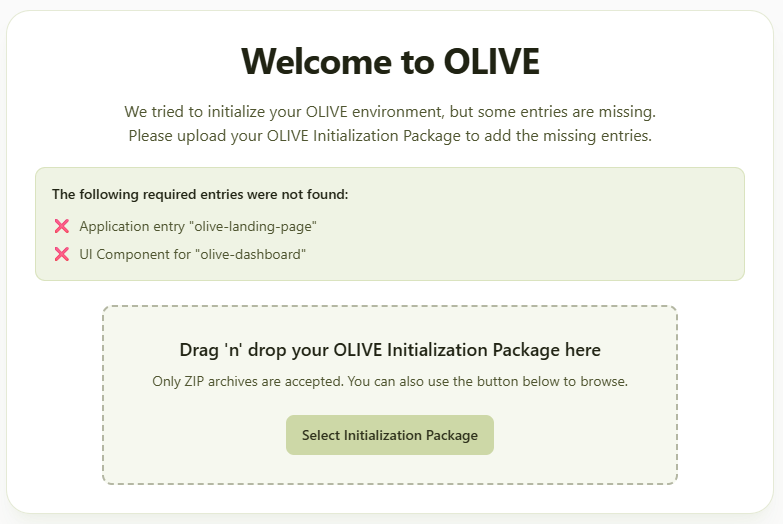
Drag and drop the foundational OLIVE Connectivity Bundle. It is in the development package, under:
03 Foundational Configuration Package
One bundle, one import. In OLIVE 1.3 it also carries the handbooks — see The handbooks come with it.
During migrations: When upgrading from an earlier version (e.g., 1.1.x to 1.2.0), the start page will not automatically detect missing configuration packages. You must manually import the required configuration packages through the repository editor's import dialog.
Import for OLIVE Platform Version < 1.1.0
Navigate to https://repo.<tenant>.<cluster>.<domain> (for example: https://repo.qa-release.develop.olive/) and import the foundational OLIVE Connectivity Bundle (OCB) for your OLIVE version.
For production deployments, deploy the OLIVE Connectivity Bundle (OCB) into each tenant that needs it.
Earlier versions deployed the OCB to a dedicated common-assets tenant first and then to the specific tenants. OLIVE 1.3 has no common-assets tenant — import the bundle into each tenant directly.
The handbooks come with it
In OLIVE 1.3 the handbooks are packaged inside the foundational OCB. Importing that one bundle brings them with it, so there is no separate handbook import to perform. This changed in 1.3 — 1.2.0 required importing them as two further bundles.
The handbooks are:
- The Connectivity Developer Handbook
- The Platform Administrator and Operator Manual
Importing a handbook on its own
You may still want to, and the usual reason is that a handbook has been updated since the foundational bundle you imported — documentation corrections ship more often than the platform does. Importing one on its own replaces that handbook without touching the rest of the tenant's content.
- Navigate to the repository at
https://repo.<tenant>.<cluster>.<domain>- Example:
https://repo.qa-release.develop.olive/
- Example:
- Locate the handbook OCB in the development package. For 1.3.0:
02 Platform Setup & Deployment/OLIVE Administrator and Operator Manual - 1.3.0.zip04 Handbook/OLIVE Handbook Documentation - 1.3.0.zip
- Import it into the repository.
In a production deployment only a user holding the admin role can import a bundle — an editor cannot. A development deployment has no authentication and a single user who holds every role, so the distinction is not visible there. See Tenant Administrators → Export and Import.
Next Steps
Congratulations! Your OLIVE Platform is now fully deployed and configured.
For additional guidance on platform operations and administration, refer to:
- Shared Responsibility – who owns which control across the platform team, the cluster operator and the Platform Administrator
- OLIVE Admin Guide – Explore additional administration topics
Next
Once the foundational bundle is imported, the platform starts running its own liveness check every five minutes. See Verify the Deployment.