Deployment Options and Tenant Isolation
This page summarizes where OLIVE can run, how OLIVE DEV and OLIVE PROD relate to those environments, and how tenant isolation can be modeled (parallel silo vs multi-tenant). Use it together with Introduction & Deployment Approach before you size infrastructure and choose chart values.
For typical development vs production cluster profiles (single-tenant dev, multi-tenant prod, common add-ons such as Keycloak or Argo CD), see Development and Production Environment Deployment.
Deployment locations
| Location | Typical usage | Advantages | Disadvantages |
|---|---|---|---|
| Lab | Development (DEV); production testing (PROD — validation only) | Full control over the environment; one-time hardware cost; no major security concerns; quick to set up and test ideas; no external dependencies; access limited to the internal network | Network configuration required for each user; requires some setup and infrastructure knowledge; not suitable for real customer data |
| In house | Production (PROD); development (DEV) possible if needed | Security managed by the operator; one-time hardware cost; easier to meet internal compliance rules; stable and predictable environment; network access mostly internal (public access needs extra effort) | Must follow internal processes and approvals; slower to scale when demand grows; maintenance effort (updates, fixes, hardware) |
| Public cloud | Production (PROD) | Easy to scale; fast setup and deployment; public access available; security handled by the operator (shared with the cloud provider); high availability and reliability | Ongoing costs that need monitoring; requires cloud know-how; dependency on the cloud provider |
OLIVE DEV and OLIVE PROD
We distinguish between these deployment types:
- OLIVE DEV: Single-user setup, no login required.
- OLIVE PROD: Multi-user setup with login and basic access control.
These variants refer to OLIVE product behavior (see Introduction & Deployment Approach); you can still run either in a lab, in-house, or cloud environment depending on policy and need.
Tenant isolation
Tenants are always isolated from each other. What this section decides is how many shared runtime pools you run, not whether the boundary exists:
- Multi-tenant deployment — one shared runtime pool, with one tenant deployment per tenant beside it.
- Parallel silo deployment — the same thing, more than once: a separate shared runtime pool with its own tenants.
There is no "silo mode". A parallel silo is a second multi-shared pool with its own multi-tenant deployments — the same two deployment modes, applied twice. So the choice is not between two architectures but between one pool and several, and you can change your mind later by standing up another pool and moving a tenant to it.
What the boundary between tenants is made of, and why it does not depend on this choice, is set out in How tenant isolation is enforced: the JWT claim check in every service, the per-tenant Vault role, the per-tenant namespace and storage, and NetworkPolicy. The first three are always on.
What a second pool genuinely buys you is independent version lifecycles and a separate failure domain for the shared services. What it costs is a second baseline footprint, and a second set of everything to operate and upgrade.
Parallel silo deployment
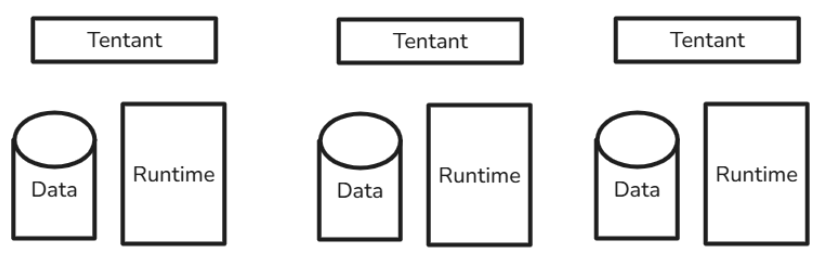
- Each tenant runs against its own shared runtime pool.
- Pools can sit on the same cluster and share the same Vault, Keycloak and ingress, but do not have to.
Advantages
- Each pool can run a different OLIVE version; upgrades are independent per pool.
- A fault in one pool's shared services cannot affect tenants on another pool.
Example
- Tenant A: OLIVE 1.1.1
- Tenant B: OLIVE 1.1.0
Trade-offs
- Higher resource usage and higher costs: each pool carries its own full set of shared services.
- Twice the operational surface — two pools to upgrade, monitor and verify.
Multi-tenant deployment
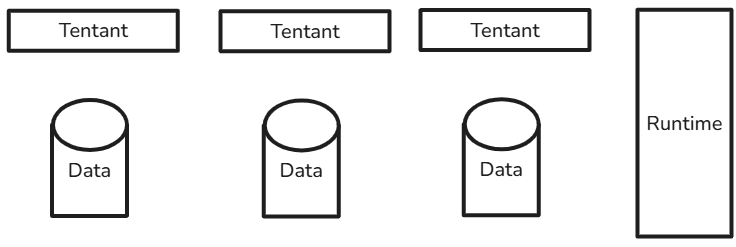
- Multiple tenants share one runtime pool of stateless services.
- Each tenant still has its own namespace, its own CouchDB and SeaweedFS, its own Temporal workers and its own Keycloak realm.
- Tenants are upgraded with the pool.
Advantages
- Lower resource usage and lower costs.
Trade-offs
- Tenants are upgraded together.
- Less flexibility per tenant.
At a glance
| Parallel silo | Multi-tenant | |
|---|---|---|
| Shared runtime pools | Several | One |
| Tenant boundary | Four mechanisms — identical in both | Four mechanisms — identical in both |
| Data isolation | Per tenant — identical in both | Per tenant — identical in both |
| OLIVE versions | Can differ per pool | One version per pool |
| Upgrades | Per pool | All tenants on the pool together |
| Failure domain of the shared services | Per pool | Shared by all tenants on the pool |
| Resources / cost | Higher | Lower |
The first three rows are deliberately identical: isolation between two tenants does not improve by giving them separate pools. What improves is the independence of their lifecycles.
One pool is the normal arrangement, and the one to choose unless a specific requirement says otherwise — divergent upgrade windows, a regulatory separation, or a tenant large enough to warrant its own shared services. Adding a pool later and moving a tenant to it is a supported path; it is not a decision you have to get right before the first install.
Next Steps
With your deployment location and tenant isolation strategy decided, proceed to:
Development and Production Environment Deployment – Learn about typical cluster architectures for development and production environments, and understand the resource allocation patterns for your chosen strategy.