Registries and Repositories
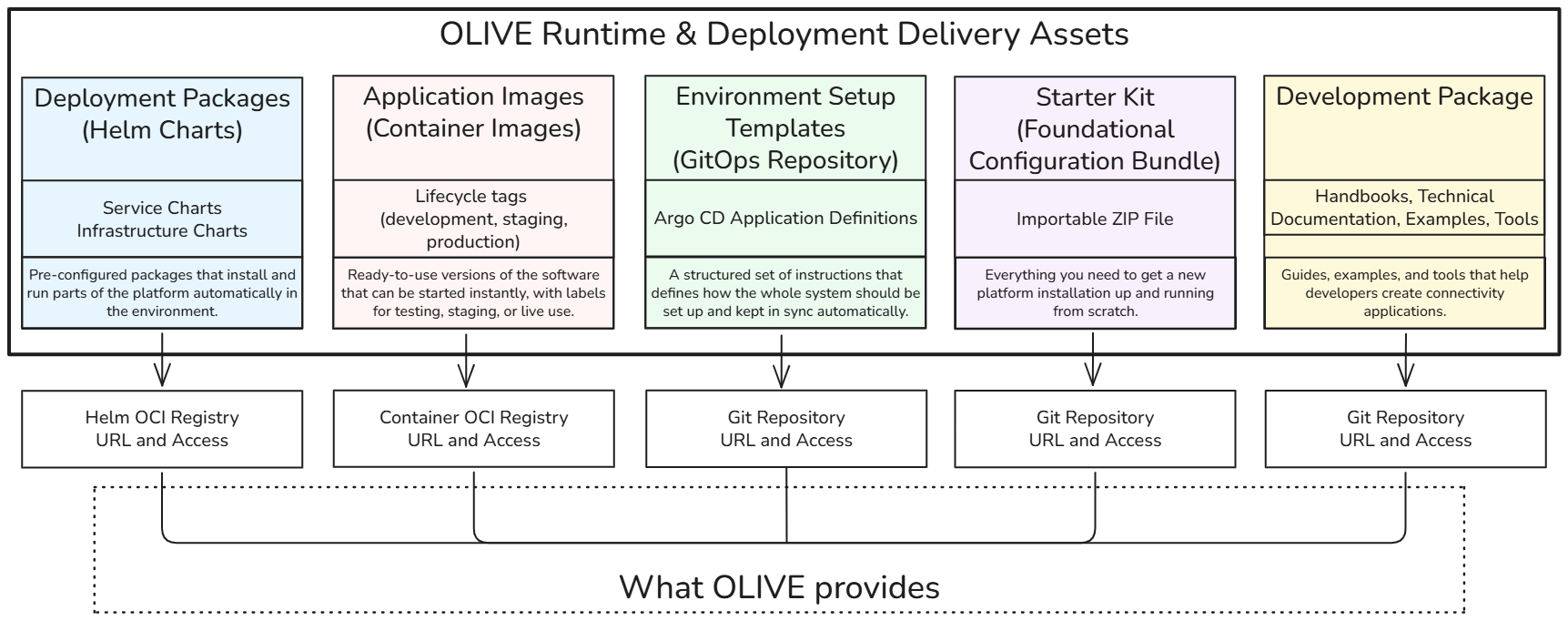
The OLIVE Platform delivers Helm charts, container images, GitOps blueprints, and related assets through a single OLIVE delivery package. The table below lists the main components and access points.
| Category | Component | Description (Non-Technical) | Access URL |
|---|---|---|---|
| Source & Project Hub | GitLab (Main Repository) | Central place where all platform code, configurations, and projects are managed | https://gitlab.com/olive6224315 |
| Deployment Packages | Helm Chart Registry | Ready-made installation packages to deploy platform services automatically | oci://registry.gitlab.com/olive6224315/helm-charts/charts |
| Runtime Components | Container Image Registry | Pre-built application components that can be run instantly in different environments | oci://registry.gitlab.com/olive6224315/docker-images |
| Environment Configuration | Deployment Blueprint (GitOps Repository) | Structured setup instructions that define and automate how the full system is deployed and maintained | https://gitlab.com/olive6224315/cluster-infrastructure/cluster-infra-template.git |
| Developer Enablement | Development Package (Initialization, Documentation & Examples) | Documentation, initialization package, tools, and examples to help developers connect and extend the platform | https://gitlab.com/olive6224315/dev-package.git |
| Starter Kit | Foundational Connectivity Bundle | Everything needed to set up a fresh OLIVE Platform installation from scratch, including the handbooks. In the development package, under 03 Foundational Configuration Package. | https://gitlab.com/olive6224315/dev-package.git |
You can install and operate OLIVE using either of these models (both are cloud-agnostic and align with common CNCF practices):
- GitOps (Argo CD) — automated, declarative lifecycle management (recommended for production-style flows; see Install with Argo CD).
- Helm install — direct chart installation for smaller or simpler environments (see Install with Helm CLI).
For chart and image registry access tokens and warnings, see Introduction & Deployment Approach.
Verify registry access
Before deploying anything, confirm that the cluster — and whoever runs the deployment — can actually reach the chart registry and authenticate to it. OLIVE publishes a small chart for exactly this:
oci://registry.gitlab.com/olive6224315/helm-charts/charts/hello-world
For this check it is enough to fetch and render the chart. That requires no cluster access and changes nothing, and it already separates "the firewall or proxy blocks the registry" from "the credentials are wrong" from "the chart itself fails".
# Authenticate once (the token is issued by the OLIVE team)
helm registry login registry.gitlab.com -u <user> -p <token>

# 1. Can the chart be fetched at all?
helm pull oci://registry.gitlab.com/olive6224315/helm-charts/charts/hello-world

# 2. Render it without touching the cluster
helm template registry-test oci://registry.gitlab.com/olive6224315/helm-charts/charts/hello-world
If both commands succeed, the Helm chart registry is reachable and the chart credentials are valid. The container image registry is a separate endpoint with its own pull credentials and is not covered by this check.
The same chart is also a quick way to test that Argo CD can reach the registry with the credentials configured in it: point an Application at it, sync, and delete it again. That check is worth doing before the first real sync, because a registry credential problem in Argo CD otherwise appears as a failed sync of the whole platform.
Beyond the registry check, the hello-world chart can optionally deploy a static test page behind Traefik to verify the public path (DNS → load balancer → ingress → pod). That is a networking test rather than a registry test; see Networking. If you install the chart here, review its values first so you only enable what you intend to deploy.
If the pull fails behind a proxy or a firewall, the host to allow is registry.gitlab.com over HTTPS.
Network requirements
Installing and running OLIVE requires the cluster to reach registry.gitlab.com over HTTPS — for the Helm charts and, separately, for the container images. Both are OCI endpoints on that one host. This is a prerequisite rather than a preference: there is no offline installation path, and a cluster that cannot reach the host cannot install or upgrade the platform.
Tell your cluster operator early. In environments where egress is controlled, a single allow-listed host is usually straightforward to arrange, but it is not always quick.
If you prefer to pull from a registry of your own, mirroring the charts and images into it works in principle and some organisations do it — but the procedure is not documented and not part of what OLIVE supports, so you would be deriving the per-chart overrides yourself. The one part that is published, and that you would need either way, is the complete list of what OLIVE deploys and where each image comes from: Container images.
OLIVE signs the container images it builds, with keyless cosign. Whether you verify those signatures at admission is your decision — it is one of the switchable controls, off by default.
If you do enable it, keyless verification needs the public internet. Keyless means there is no stored public key: the verifier checks the signing certificate against Fulcio and the signature's transparency-log entry against Rekor (https://rekor.sigstore.dev by default), and both calls happen inside the admission call, synchronously, while a pod is being created. So the Kyverno pods need HTTPS egress to fulcio.sigstore.dev, rekor.sigstore.dev and tuf-repo-cdn.sigstore.dev — not the whole cluster, just them. The last is the TUF root the cosign client refreshes.
What happens without that route is worth knowing before you enable the control, because neither outcome is an error message:
imageVerification.mode: enforcewithfailurePolicy: Failmeans no pod can be created in an enrolled namespace, since verification can never complete.- With
failurePolicy: Ignoreit fails open: pods are admitted unverified, and the namespace looks protected while nothing is checked.
The image registry allow-list is unaffected either way — it inspects the image reference and makes no network call at all, which is why the recommended posture is that control at enforce and signature verification at audit. That keeps the stronger check reporting into your monitoring without making pod creation depend on a public service you do not operate. See Admission Policies → The recommended posture.
Next Steps
Now that you understand the available registries and delivery packages, proceed to:
Deployment Options and Tenant Isolation – Decide where to deploy OLIVE (lab, on-house, or public cloud) and choose your tenant isolation model (parallel silo or multi-tenant).